Hold less stock.
Run out less often.
Wyzestock connects to your ERP and works out, for every item at every location, how much stock you should hold, what to order, what to move and what is tied up in excess. Seasonal forecasts, bills of material and a demand management report every morning are built in. No spreadsheets.

The right stock, in the right place, and no more
Too much stock ties up cash and warehouse space. Too little loses sales. Wyzestock balances the two for every item at every location, from the data already in your ERP.
- Stock positionModel stock, excess, shortfall
- ForecastingSeasonal, every item and location
- ReplenishmentWhat to order, and how much
- DistributionWhat to move between locations
- Demand managementSales against forecast, daily
- Bills of materialComponents from finished goods
A target for every item
Model stock, reorder point and safety stock are worked out from the forecast, the lead time and the service level each item deserves, so A items are protected and slow sellers are not overstocked.
Action lists, not reports
Stock-outs, items about to run out, excess, slow movers, overdue purchase orders and suggested orders and transfers, each in its own list, ready to act on.
Current every day
Stock, sales, open orders, purchase orders and recipes are read from your ERP twice a day and everything is recalculated, so the numbers are never last month's.
Everything you need to plan stock, in one place
One platform that turns the stock, sales and orders already in your ERP into targets, exceptions and suggestions, recalculated every day.
Stock position
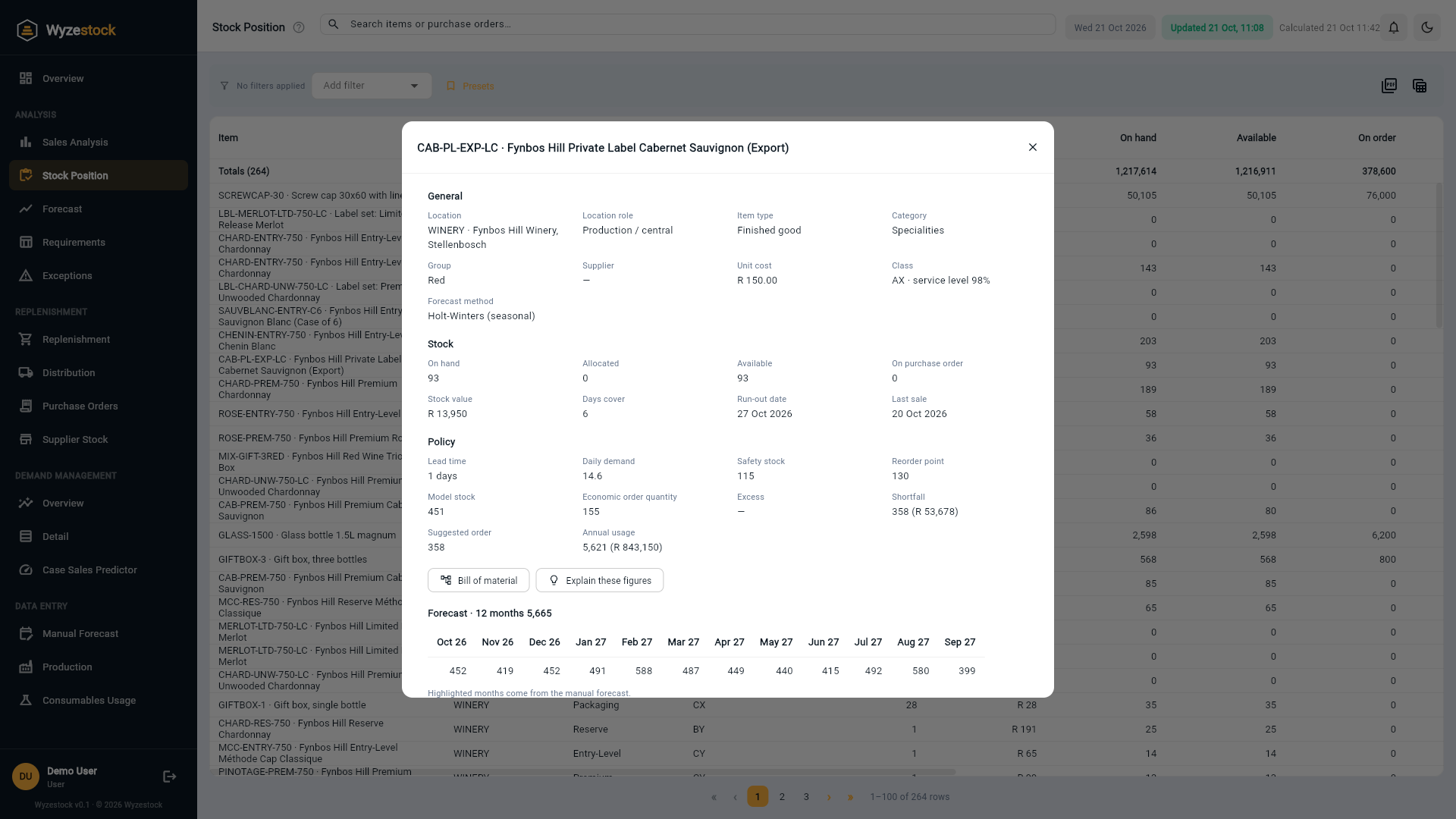
On hand, allocated, available and on order for every item at every location, against its model stock, with days of cover and the run-out date.
Model stock and safety stock
Targets from the forecast, the lead time and a service level set by ABC-XYZ class, so stock goes where it earns its keep.
Exceptions
Stock-outs, potential stock-outs, excess, slow-moving stock and surplus orders, each listed with its value so you start with what matters most.
Replenishment
Suggested orders per supplier, rounded to the minimum order and pack size, with the economic order quantity alongside.
Distribution
Transfers between locations that cover shortages from stock you already own, before anything new is bought.
Seasonal forecasting
Holt-Winters forecasts for every item at every location, with sensible handling of new, occasional and dormant items, and manual overrides where you know better.
Demand management
Sales against forecast, stock cover and production month to date, emailed as an Excel report every morning, plus the Case Sales Predictor.
Bills of material
Component demand worked out from finished-good sales through your recipes, and a clear view of what each product is made from and used in.
AI Insights
Plain-English explanations of an item's figures, what needs attention today and a monthly commentary, with every number checked against your data.
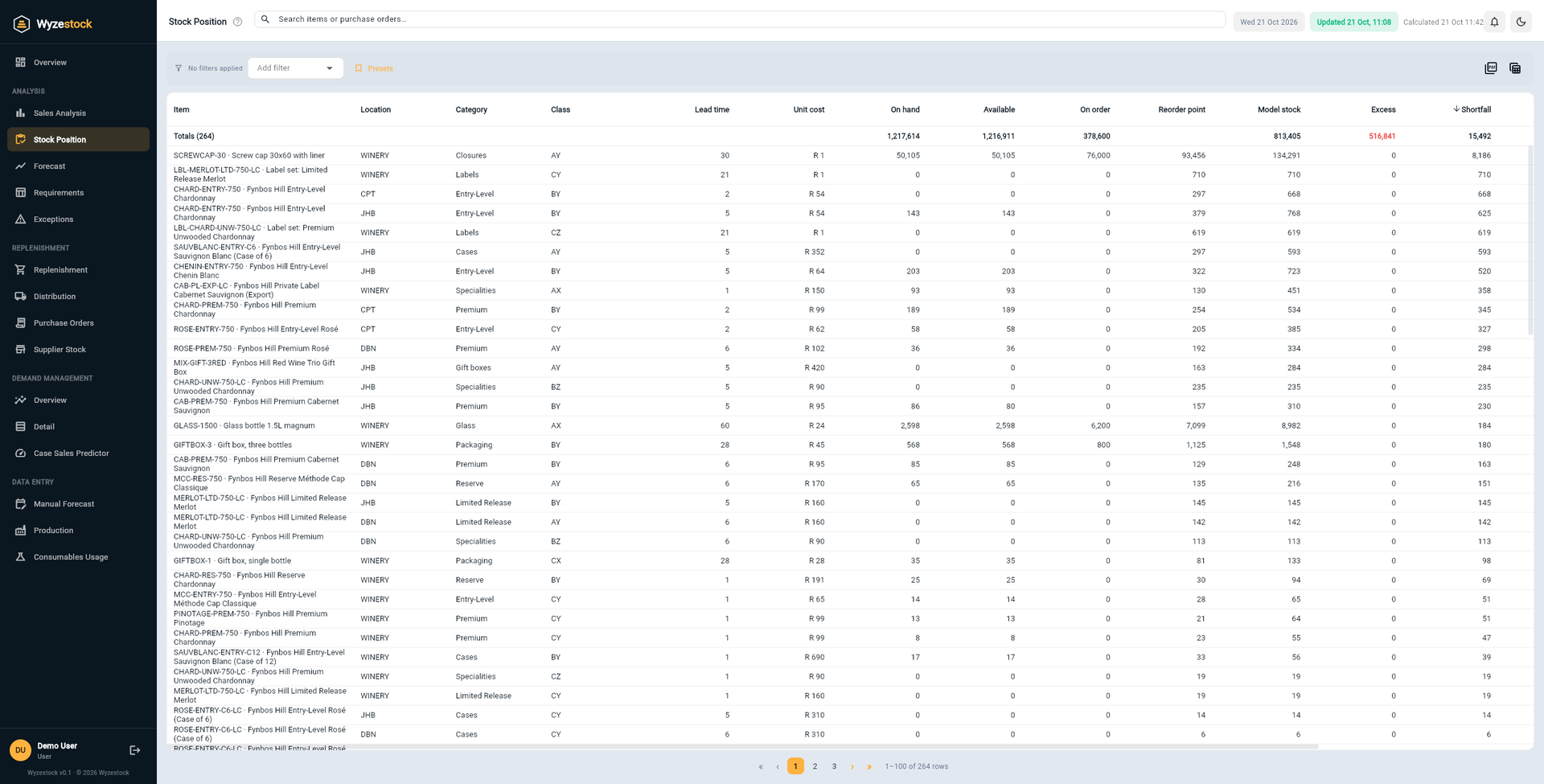
See what you hold against what you should hold
Every item at every location, with its model stock beside what is actually on the shelf. The gap, in units and in rand, is the money Wyzestock can free up, or the sales it can protect.
- On hand, allocated, available and on purchase order
- Model stock, reorder point and safety stock for each location
- Days of cover and the date it will run out
- Click any item for its full detail, forecast and bill of material
Start with the items that need you today
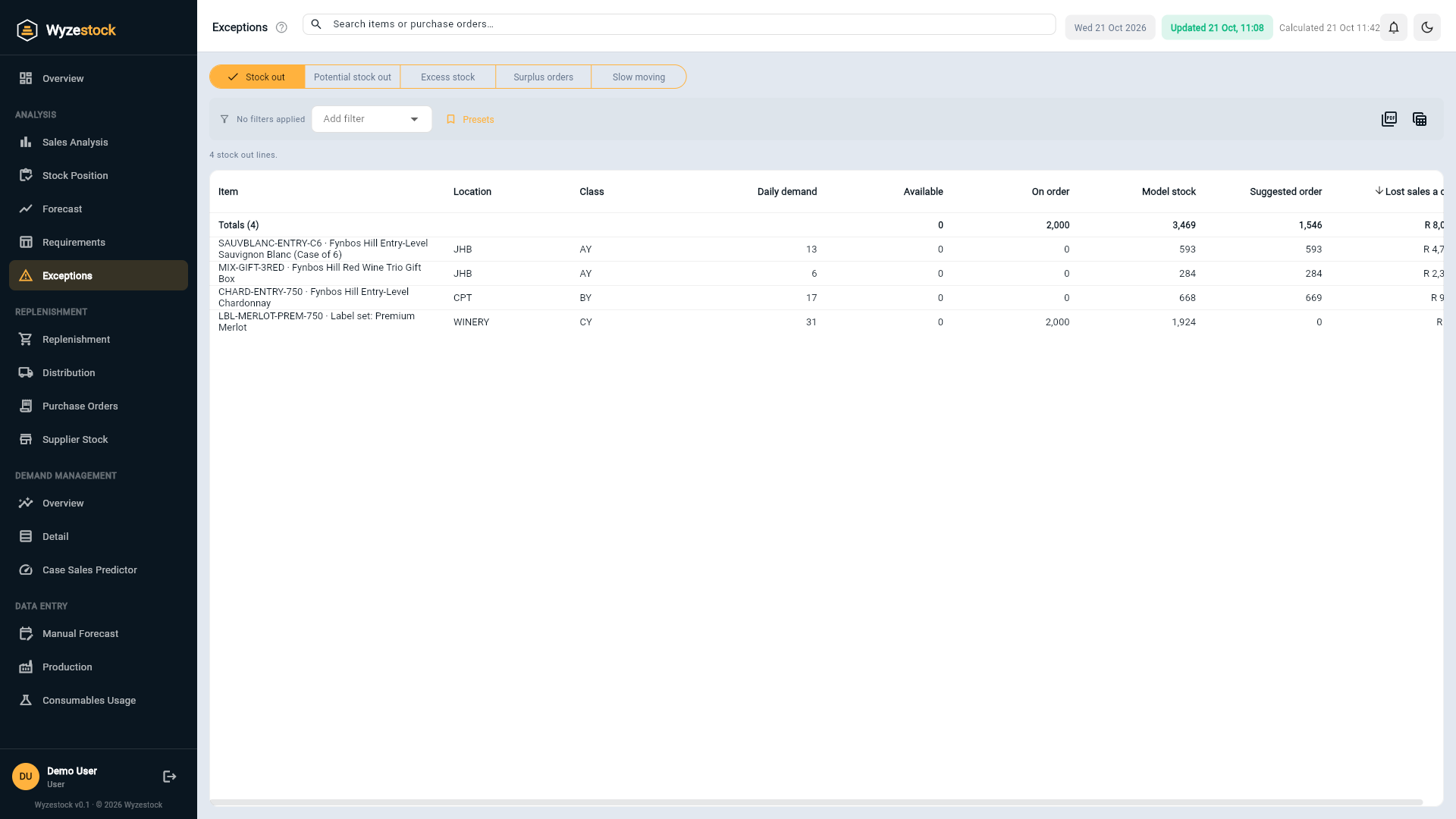
Wyzestock sorts the exceptions out of thousands of item and location combinations and puts a value on each, so the first thing you look at is the thing that costs the most.
- Stock-outs and items that will run out before stock can arrive
- Excess above model stock, valued at cost
- Slow-moving stock by 30, 60, 90 and 120 days without a sale
- Purchase orders that are more than you need
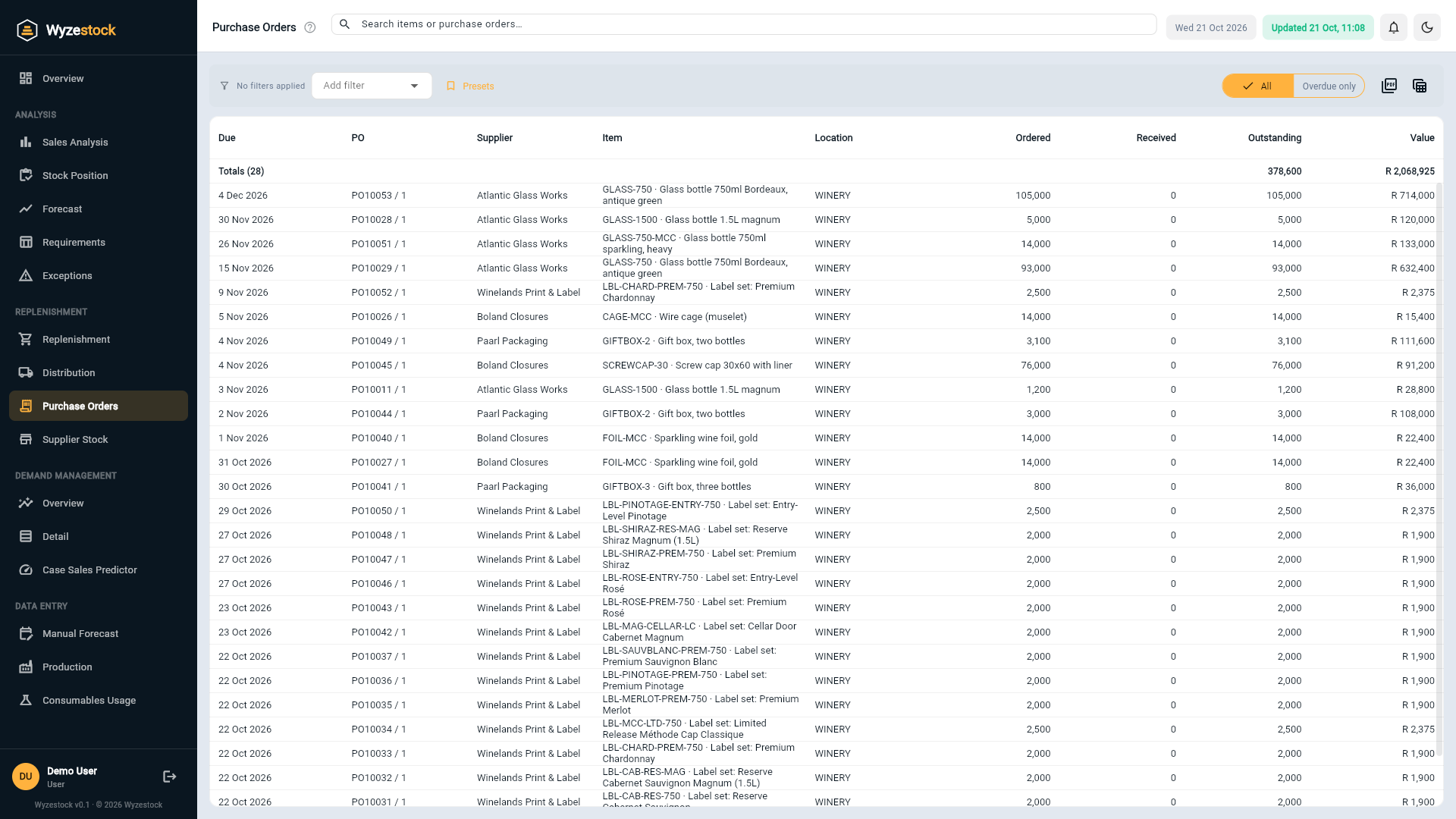
Know what to order, from whom, and how much
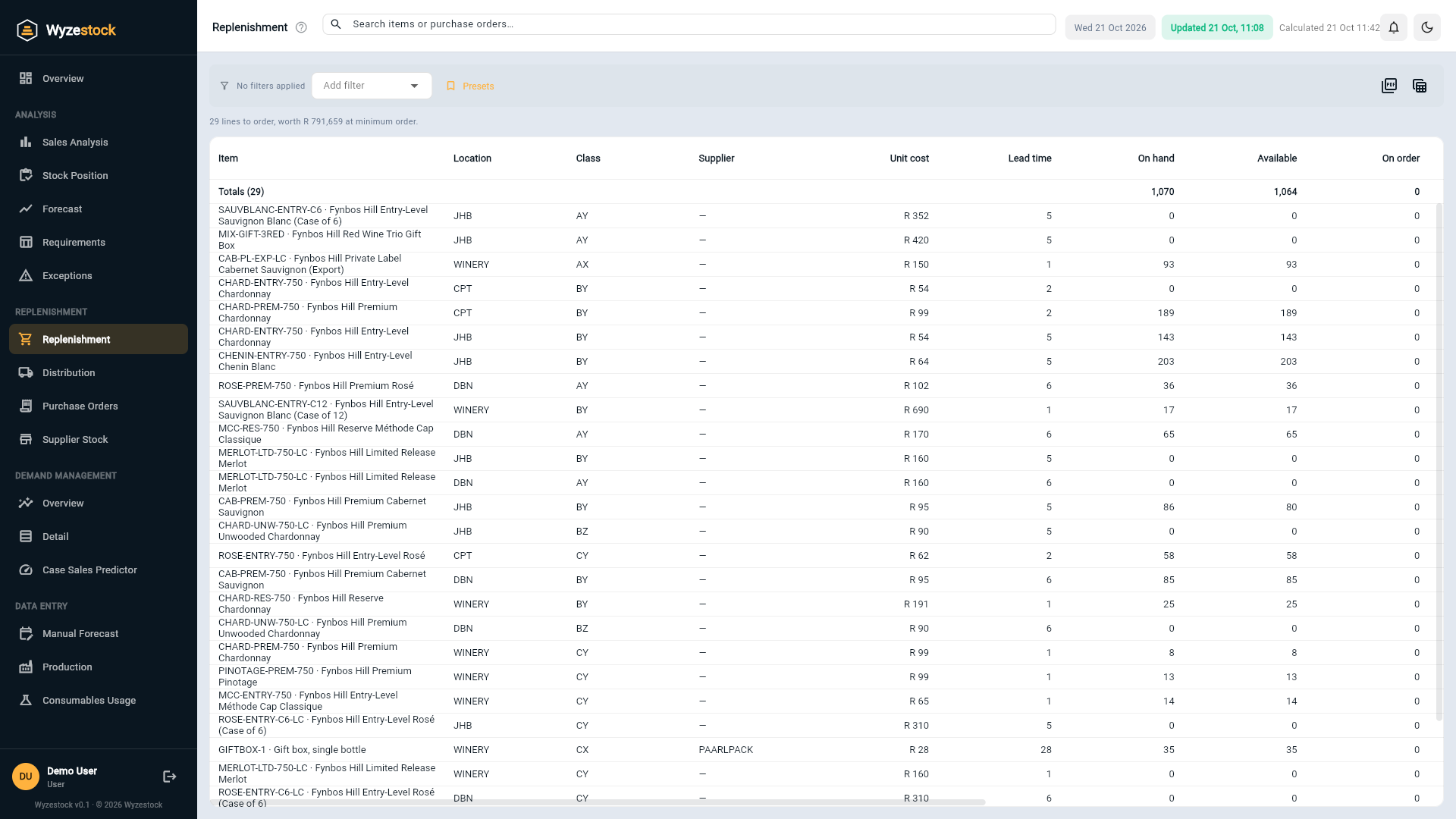
Suggested orders for every supplier, worked out from the model stock, what is already on order and the lead time, and rounded the way you actually buy.
- Rounded to the minimum order quantity and the pack or pallet multiple
- Economic order quantity alongside, for the items where it matters
- Open purchase orders, with the overdue ones highlighted
- Filter by supplier, location, group or category and export to Excel
Move stock before you buy more of it
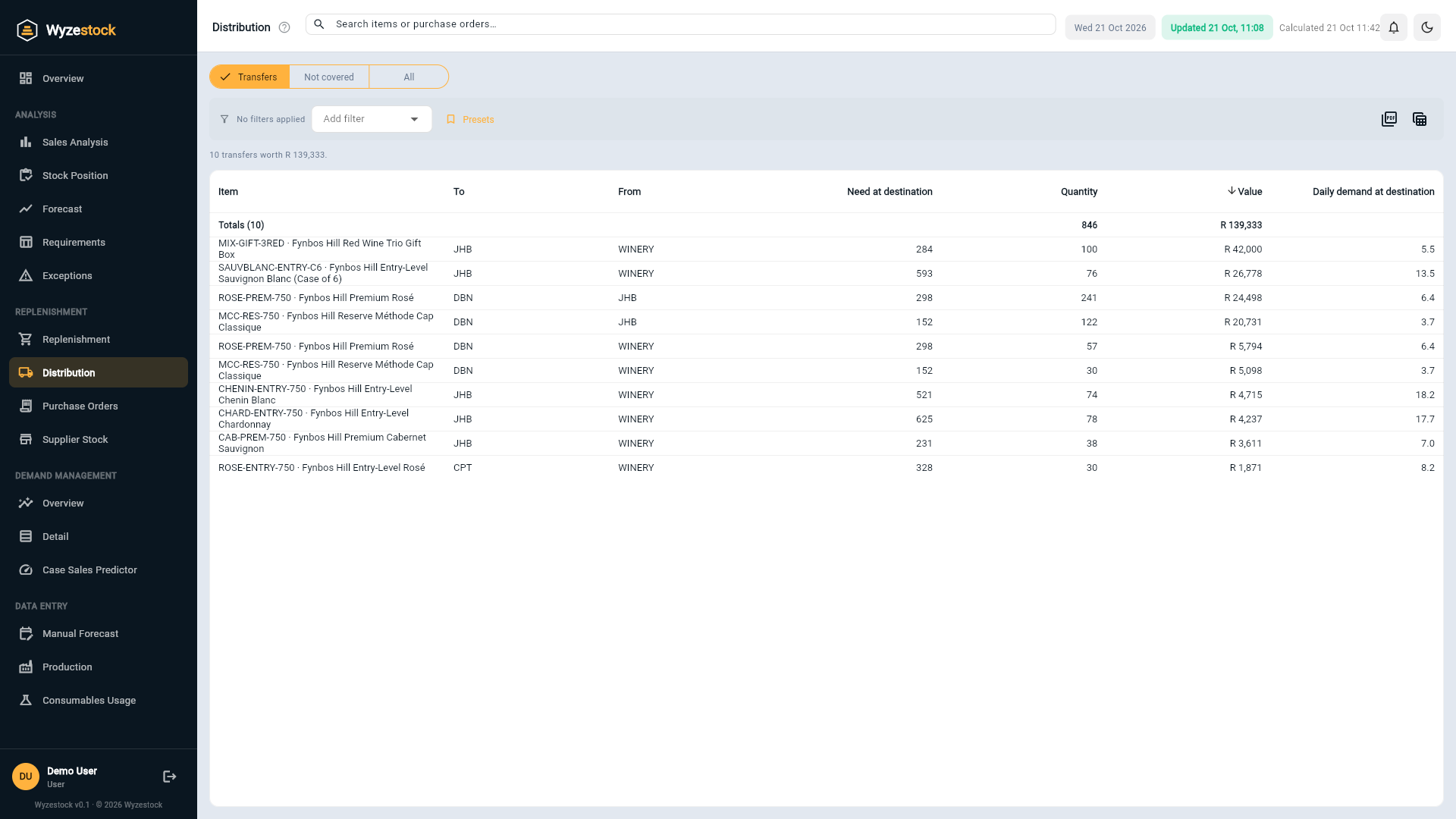
One depot is short while another holds too much. Wyzestock suggests the transfers that cover the shortage from stock you already own, from the locations you choose, in the order you choose.
- Transfers from your production or central warehouse first, then from other depots
- Lines that cannot be covered, so you know what to make or buy
- The value of every transfer and every uncovered line
- Press any line to see the item at every location
The state of the month, in your inbox every morning
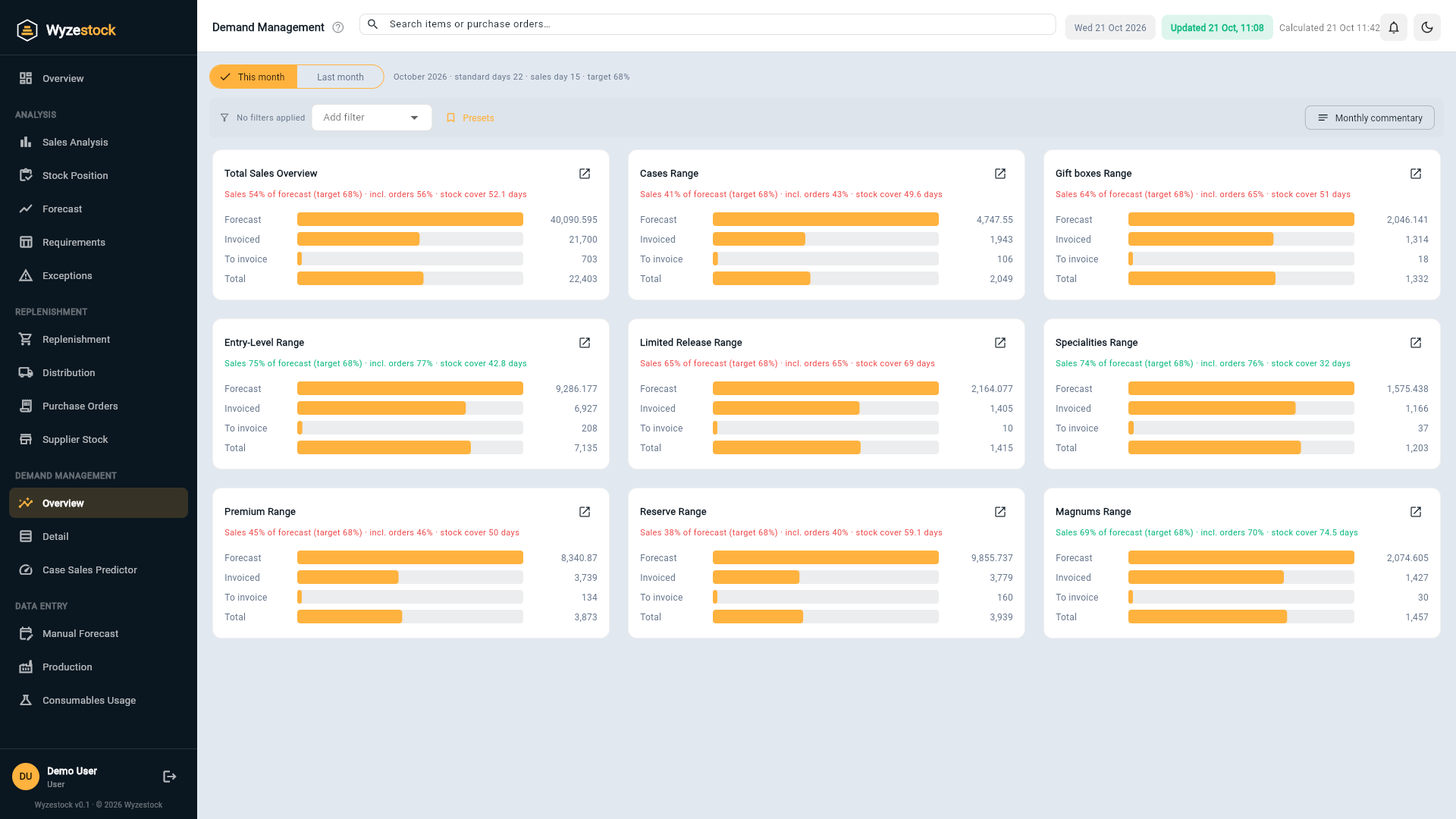
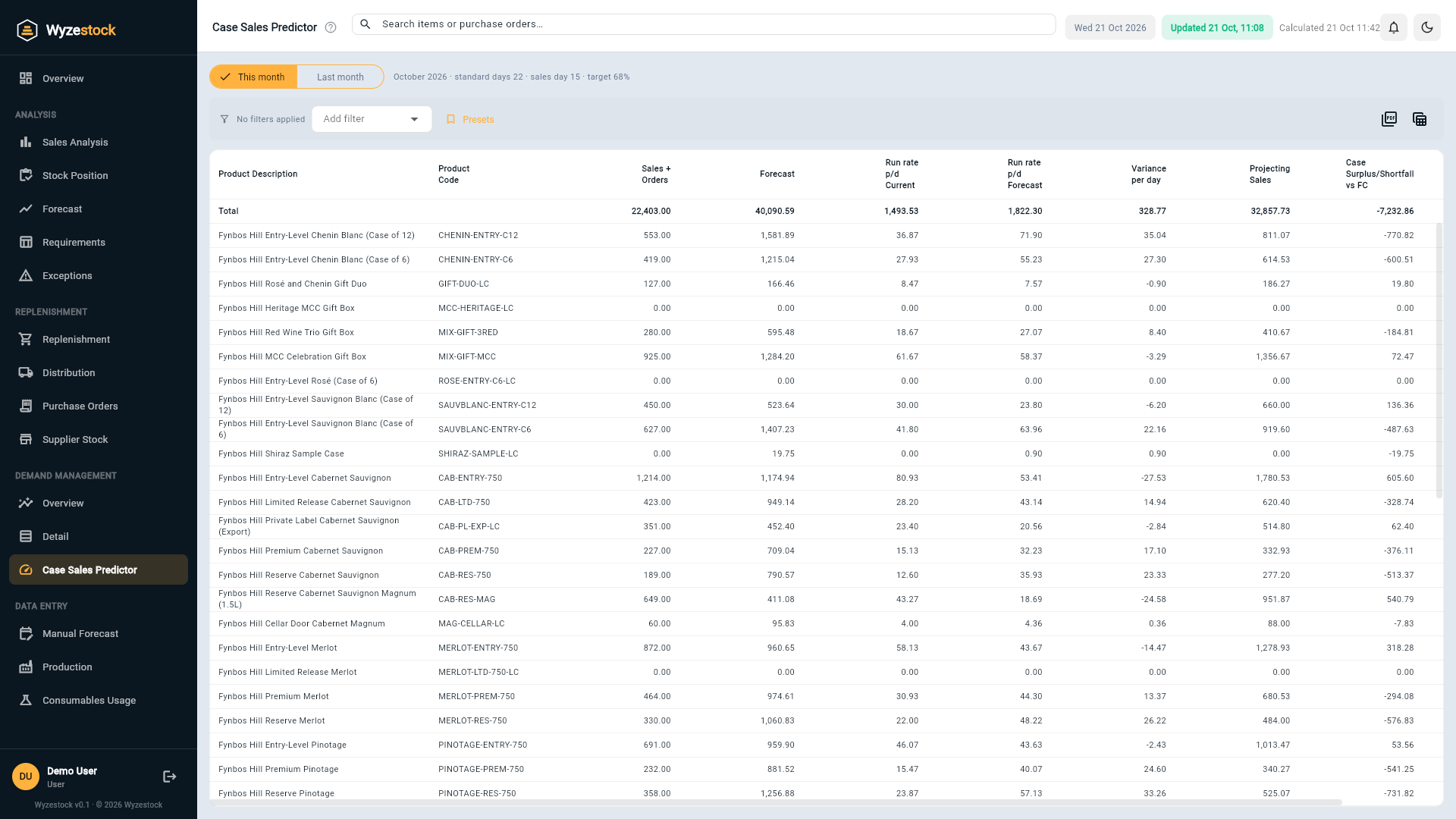
Sales month to date against forecast, the run rate for the rest of the month, stock cover and production against plan, by range and by item. Emailed as an Excel report after the morning update.
- Overview by range, with the target for the day of the month
- Detail laid out like the report your team already uses
- Case Sales Predictor: where each item will land at the current run rate
- Production plan and manual forecast captured in the app
From finished goods to every component behind them
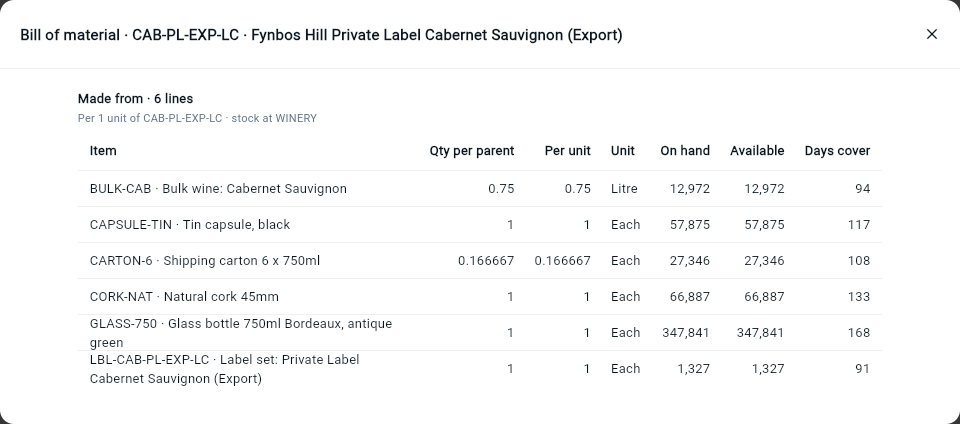
Wyzestock reads your recipes from the ERP, works out component demand from finished-good sales, and shows what each product is made from and where each component is used.
- Component forecasts from finished-good demand, at the production location
- Made from: every component, every level, with the stock behind it
- Used in: which finished goods a short component will stop
- Raw materials, packaging and consumables planned like everything else
Ask why, and get an answer in plain English
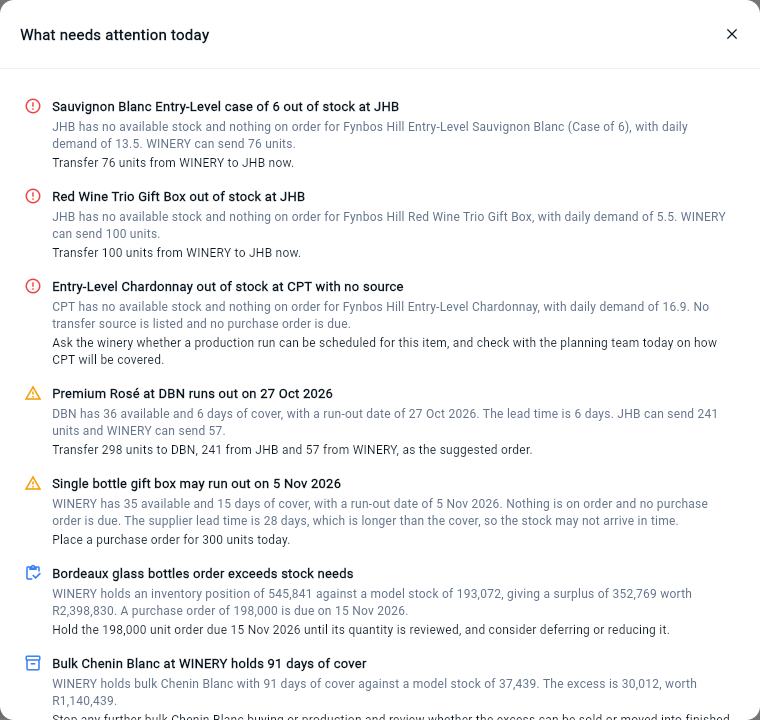
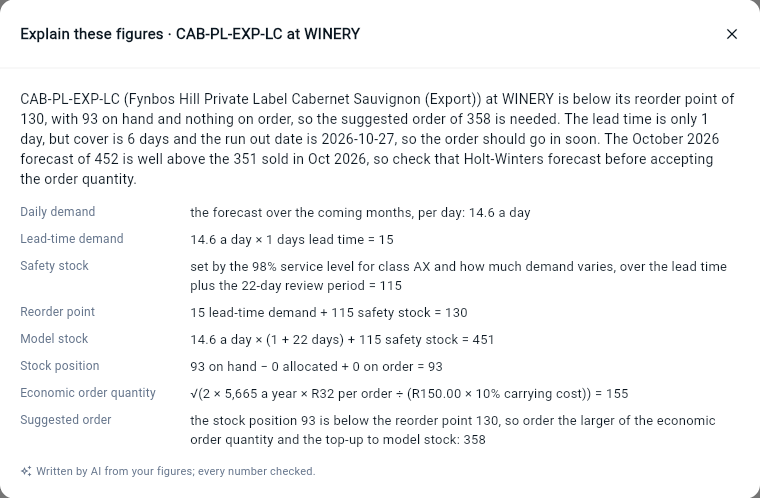
Buttons in Wyzestock explain an item's figures, say why it is excess or slow moving, list what needs attention today and write the monthly demand commentary. Every number in the answer is checked against your data before you see it.
- Explain these figures, for any item at any location
- What needs attention today, ranked, with a suggested next step
- Monthly commentary for the demand management meeting
- A review of the forecasts that look out of line
No exports. No spreadsheets. Nobody has to remember to run anything.
A small service on your server reads stock, sales, open orders, purchase orders and recipes from your ERP twice a day. Wyzestock recalculates everything and the screens are simply current.
- Read-only: nothing in your ERP is changed
- Twice a day, at 07:00 and 14:00, automatically
- If a load fails or is late, we know about it before you do
The details that make it fit
Small touches that make Wyzestock feel built for your business.
Service levels by class
Every item is classed A, B or C by value and X, Y or Z by how steady its demand is, and each class gets the service level you choose.
Your working days
Public holidays and shutdowns are left out of the working days that drive run rates, review periods and the demand report.
Production and distribution
Production, depot and stock-only locations, each with its own role and lead time, and the sources each depot draws from.
Export to PDF and Excel
Any list can go out as a PDF or a spreadsheet, with the filters you applied printed at the top.
Light and dark, any device
Fully responsive on desktop, tablet and phone, with a light and a dark theme.
Secure, role-based access
Each company's data is kept apart, and each user sees what their role allows.
Let's see if Wyzestock fits your business
Tell us what you stock, where you hold it and which ERP you run, and we'll get back to you, usually within a business day.
For ERP or accounting partners, see how we work with you. Download the one-page overview (PDF).